Best Laptops for Animation Under $2,500

By the FilterKilter Editorial Team

Updated June 4, 2026

How we rank

Best Laptops for Animation Under $2,500 is really about balancing GPU headroom, sustained performance, and enough memory for demanding workloads. This list leans into under $2,500, 32 GB of RAM or more, 1 TB of storage or more, 8+ CPU cores, a dedicated GPU, and 15.5" and larger displays so you can compare the laptops that actually fit the brief. Use it as a shortlist, then narrow further inside FilterKilter once you know which tradeoffs matter most to you.

What to Look For

  • Set your budget first and treat under $2,500 as a hard constraint so you do not compare laptops that solve different problems.
  • Aim for at least 32 GB of RAM here so the laptop still feels comfortable once you add browser tabs, meetings, and background apps.
  • Storage fills up faster than buyers expect, so treat 1 TB as a practical floor once apps, media, SDKs, or project files start to accumulate.
  • If this category leans on sustained work, 8+ CPU cores is a useful baseline because burst performance alone does not tell you how the laptop feels under real load.
  • A dedicated GPU is part of the value equation in this category, but cooling and sustained performance matter just as much as the chip name on the spec sheet.

How We Chose

Best Laptops for Animation Under $2,500 is for buyers comparing under $2,500, 32 GB of RAM or more, and 1 TB of storage or more. The hard part is separating meaningful specs from nice-looking extras, so this guide ranks live catalog picks by GPU headroom, sustained performance, and enough memory for demanding workloads.

  • 1Each pick must match the guide brief: under $2,500, 32 GB of RAM or more, 1 TB of storage or more, 8+ CPU cores, a dedicated GPU, and 15.5" and larger displays.
  • 2The generator sorts matching laptops by overall FilterKilter rating first and applies a per-brand cap so one lineup does not crowd out the page.
  • 3The price ceiling is enforced from the slug and the product data, so an "under $2,500" guide cannot include over-budget picks.
  • 4Dedicated-GPU picks are judged on graphics capability, memory, cooling headroom, display quality, and price.
  • 5RAM and SSD capacity are treated as practical ownership factors, not just spec-sheet decoration.

Our Top Picks

Affiliate disclosure: Links to retailers on this page are affiliate links. If you buy after clicking one, we may earn a commission at no extra cost to you. Commissions do not influence which laptops we rank or in what order. See our full Affiliate Disclosure.

Data & accuracy: Rankings are based on publisher specifications, retailer pricing snapshots, and published system requirements. We do not physically test every laptop listed, and prices, configurations, and availability change frequently. Always confirm the exact configuration and final price on the retailer’s site before buying. See our full methodology →

Informational only: Content on this site is provided for informational purposes and is not professional, financial, or technical advice. Use your own judgment when making a purchase.

Acer Nitro V 15 Gaming Laptop1

Image: Amazon · Affiliate link

Best for higher frame rates

Acer Nitro V 15 Gaming Laptop | 15.6" FHD IPS 165Hz Display | Intel Core i9-13900H | NVIDIA GeForce RTX 5060 | 32GB…

Acer

32 GB RAM1 TB StorageIntel Core i9-13900HNVIDIA GeForce RTX 506015.6"
$1,377.75

Why it made the list: Starts the list off as a gaming-series machine with real cooling under the hood, which is the use case most readers of this page are actually trying to solve. It works as the practical middle path when none of the more specialized picks line up cleanly. The faster 165Hz screen gives it a smoother feel than basic productivity laptops, even outside games.

Acer Nitro V 16S AI Gaming Laptop2

Image: Amazon · Affiliate link

Best for higher frame rates

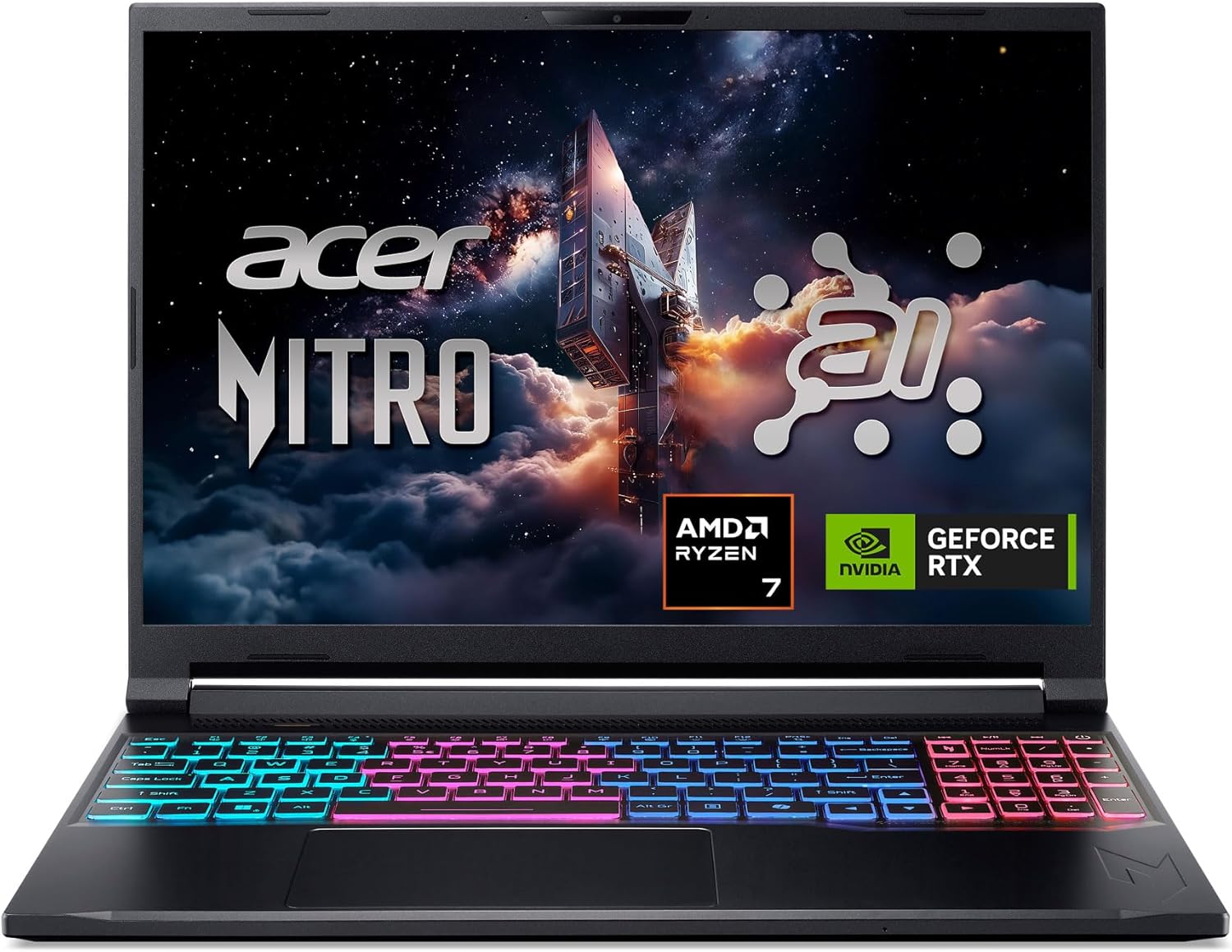
Acer Nitro V 16S AI Gaming Laptop | AMD Ryzen 7 260 Processor | NVIDIA GeForce RTX 5060 Laptop GPU (572 AI Tops) | 16"…

Acer

32 GB RAM1 TB StorageAMD Ryzen 7 260NVIDIA GeForce RTX 506016"
$1,399.99

Why it made the list: It makes the most sense when the laptop spends as much time in transit as it does open on a desk. a Ryzen 7-class processor is the processing anchor here, giving the configuration a clearer workload fit than entry chips with nicer marketing names.

ASUS TUF F15 Gaming Laptop 15.6" FHD 144Hz Intel 14-Core5

Image: Amazon · Affiliate link

Best for higher frame rates

Asus TUF F15 Gaming Laptop 15.6" FHD 144Hz Intel 14-Core i7-12700H (Beat i9-11950H) 32GB RAM 1TB SSD GeForce RTX 4070…

ASUS

32 GB RAM1 TB StorageIntel Core i7-12700HNVIDIA GeForce RTX 407015.6"10 hr battery
$1,999.99

Why it made the list: It earns its place by covering a broader everyday workload instead of solving only one narrow niche. The 144Hz refresh rate makes scrolling and window animations feel smoother than the 60Hz panels most of this price band is stuck with. A 1TB SSD gives it more breathing room than the 256GB-512GB drives common at this tier, especially once apps, project files, or games pile up.

ASUS ROG Strix G16 16" WUXGA 165Hz Gaming Laptop6

Image: Amazon · Affiliate link

Best for higher frame rates

ASUS ROG Strix G16 16" WUXGA 165Hz Gaming Laptop, NVIDIA GeForce RTX 5070 8GB GDDR7, AMD Ryzen 9 8940HX, 32GB DDR5, 2TB…

ASUS

32 GB RAM2 TB StorageAMD Ryzen 9 8940HXNVIDIA GeForce RTX 507016"
$2,179

Why it made the list: The right reader is anyone who wants a capable all-rounder rather than a laptop optimized for a single task. The 16" screen gives it more working area than the 13-14" crowd, at the cost of being slightly more of an event to carry.

Best for higher frame rates

Alienware 16X Aurora Gaming Laptop

Dell

32 GB RAM1 TB StorageIntel® Core™ Ultra 7 Processor 255HX (30MB cache, 20 cores, 1.8 to 5.2 GHz P-Core)NVIDIA® GeForce RTX™ 5060, 8 GB GDDR716"
$2,279.99

Why it made the list: The audience is someone comparing the whole laptop, not just the loudest spec on the page. At this price you are buying real margin over the entry-level picks. Nice, but overkill if your workload actually fits on a mid-list machine.

Lenovo Legion 5 Gaming AI Laptop 16" WQXGA 2560x1600 240Hz8

Image: Amazon · Affiliate link

Best for higher frame rates

Lenovo Legion 5 Gaming AI Laptop 16" WQXGA 2560x1600 240Hz (100% DCI-P3, 500nits) Intel 24-core Ultra 9 275HX 64GB RAM…

Lenovo

64 GB RAM2 TB StorageIntel Core Ultra 9 275HXNVIDIA GeForce RTX 506016"
$2,349

Why it made the list: The point is everyday breadth: enough performance, enough portability, and few glaring gaps. The flip side is straightforward: you are paying for polish and headroom here, not just checking the minimum boxes for the category.

Best premium feel

Dell XPS 16 Inch Laptop

Dell

32 GB RAM1 TB StorageIntel® Core™ Ultra 7 255H (16 Cores, up to 5.1GHz Turbo)NVIDIA® GeForce RTX™ 5050, 8GB GDDR7, 45W16.3"
$2,349.99

Why it made the list: The audience is the commuter, the coffee-shop worker, and the classroom-hopper: anyone whose laptop spends more time moving than sitting on a desk. Dell XPS 16 Inch Laptop keeps the ninth slot because 32GB memory with 1TB storage plus $2,350 street price gives this listing a specific job in the lineup. For the ninth pick, Dell XPS 16 Inch Laptop leans on 32GB memory with 1TB storage plus $2,350 street price instead of a generic value argument.

Want More Control?

Use this guide as the shortlist, then refine by price, RAM, GPU, battery life, weight, display size, and software requirements inside the full FilterKilter tool.

Open FilterKilter — Full Filtering & Sorting Tool →

Frequently Asked Questions

What should you compare first in this category?

Start with the non-negotiables for this kind of creative pro: performance, portability, display size, and price. Once those are aligned, compare smaller quality-of-life details like ports, keyboard feel, battery life, and thermals.

How much RAM is enough?

For this category, 32 GB is the safer baseline if you want consistent performance under heavier multitasking or demanding creative and technical workloads.

Why does a dedicated GPU matter here?

This category benefits from stronger graphics performance, but you should still judge the whole package: cooling, power limits, display quality, and battery life matter just as much as the GPU model.

Sources and Notes

GeForce RTX laptop GPUs

NVIDIA. GPU-family context for gaming and GPU-accelerated creative guides. Accessed 2026-05-21.

Steam Hardware and Software Survey

Valve. Market context for common gaming hardware and realistic gaming expectations. Accessed 2026-05-21.

Blender system requirements

Blender Foundation. 3D, animation, and rendering hardware guidance for creator and workstation guides. Accessed 2026-05-21.

Windows 11 system requirements

Microsoft Support. Baseline Windows hardware requirements used when judging everyday Windows laptops. Accessed 2026-05-21.

Microsoft 365 and Office resources

Microsoft Support. Office and Microsoft 365 compatibility context for school, work, and productivity picks. Accessed 2026-05-21.

Browse All Laptop Buying GuidesClick to expand
← Browse all FilterKilter buying guides