Best Laptops for Engineering Students

By the FilterKilter Editorial Team

Reviewed June 4, 2026Picks unchanged since Jun 1, 2026

How we rank

Engineering students run demanding software; CAD programs like SolidWorks and AutoCAD, simulation tools like MATLAB and ANSYS, and data analysis in Python. These picks provide the CPU power, RAM, and GPU capability that engineering coursework demands without weighing down your backpack too much.

What to Look For

  • 16 GB of RAM minimum; 32 GB if you work with large assemblies or simulations.
  • A dedicated GPU (even a mid-range one) accelerates CAD rendering and simulations significantly.
  • Look for a 15- or 16-inch display; you need screen space for complex diagrams and models.
  • Processor speed and core count matter for compilation and simulations. Intel i7/i9 or Ryzen 7/9 recommended.
  • Check your program's required software list; some engineering tools are Windows-only.

How We Chose

Best Laptops for Engineering Students is for buyers comparing under $1,500, 16 GB of RAM or more, and 512 GB of storage or more. The hard part is separating meaningful specs from nice-looking extras, so this guide ranks live catalog picks by graphics performance, thermal headroom, and overall value.

  • 1Each pick must match the guide brief: under $1,500, 16 GB of RAM or more, 512 GB of storage or more, 8+ CPU cores, and a dedicated GPU.
  • 2The generator sorts matching laptops by overall FilterKilter rating first and applies a per-brand cap so one lineup does not crowd out the page.
  • 3The price ceiling is enforced from the slug and the product data, so an "under $1,500" guide cannot include over-budget picks.
  • 4Dedicated-GPU picks are judged on graphics capability, memory, cooling headroom, display quality, and price.
  • 5RAM and SSD capacity are treated as practical ownership factors, not just spec-sheet decoration.

Our Top Picks

Affiliate disclosure: Links to retailers on this page are affiliate links. If you buy after clicking one, we may earn a commission at no extra cost to you. Commissions do not influence which laptops we rank or in what order. See our full Affiliate Disclosure.

Data & accuracy: Rankings are based on publisher specifications, retailer pricing snapshots, and published system requirements. We do not physically test every laptop listed, and prices, configurations, and availability change frequently. Always confirm the exact configuration and final price on the retailer’s site before buying. See our full methodology →

Informational only: Content on this site is provided for informational purposes and is not professional, financial, or technical advice. Use your own judgment when making a purchase.

Acer Nitro V 15.6” FHD IPS 165Hz Gaming Laptop1

Image: Amazon · Affiliate link

Best for most students

acer Nitro V 15.6” FHD IPS 165Hz Gaming Laptop|Intel Core i5-13420H|NVIDIA GeForce RTX 5050|Webcam|Backlit |Black| 16GB…

Acer

16 GB RAM512 GB StorageIntel Core i5-13420HNVIDIA GeForce RTX 505015.6"
$829.99

Why it made the list: Our top pick, and the reason is that it reads like the most practical campus-value pick in the guide. It is better positioned for CAD, simulation, and heavier technical coursework than the thinner everyday machines on this page. At $829.99 it anchors the low end of the list, which is the whole reason this pick exists here. At 4.6 pounds it is not a featherweight, but the extra heft buys a bigger screen or real cooling that the slimmer picks cannot match.

Best for heavier creative work

Acer Swift 14 AI Laptop - SF14-61T-R49D

Acer

16 GB RAM1 TB StorageAMD Ryzen™ AI 9 365 Deca-core 4 GHzAMD Radeon™ 880M dedicated memory14"
$949.99

Why it made the list: What keeps it near the top is that it fills the role of a production-minded configuration. The target reader is a student running SolidWorks, MATLAB, or similar tools where a real GPU and plenty of memory both matter. The dedicated AMD Radeon™ 880M dedicated memory is the reason heavier creative or technical work stays responsive here where it would start to choke on integrated-only peers. Weight is a real selling point here. 2.9 pounds is well under the category average and makes everyday carry a non-event. Compared with nearby picks, the useful details are AMD Ryzen™ AI 9 365 Deca-core 4 GHz, AMD Radeon™ 880M dedicated memory, 16GB RAM rather than the brand name alone.

Best for heavier creative work

Asus Expertbook P3 Pm3406

ASUS

16 GB RAM1 TB StorageAMD Ryzen™AI 7 350 Processor 2.0GHz (16MB Cache, up to 5.0 GHz, 8 cores, 16 Threads); AMD XDNA™ NPU up to 50 TOPS AMD Ryzen™AI 5 330 Processor 2.0GHz (8MB Cache, up to 4.5 GHz, 4 cores, 8 Threads); AMD XDNA™ NPU up to 50 TOPSAMD Radeon™ 860M AMD Radeon™ 820M14"
$1,149.99

Why it made the list: Think of it as a production-minded configuration. That is the niche it actually earns its place in. It fits technical work where GPU support and sustained performance are safer bets than ultraportable design alone. At 3.0 pounds, it is one of the easiest machines on this page to carry from a morning class to a late library session without thinking about it. AMD Radeon 860M matters for this guide because it brings 8 CU (512 shaders), giving GPU-accelerated apps more to work with than an integrated-only laptop. Its clearest spec identity is AMD Radeon™ 860M, 16GB RAM, 1TB SSD, a combination that keeps it from blending into the rest of the list.

Best for heavier creative work

Asus Expertbook P3 Pm3606

ASUS

16 GB RAM1 TB StorageAMD Ryzen™AI 7 350 Processor 2.0GHz (16MB Cache, up to 5.0 GHz, 8 cores, 16 Threads); AMD XDNA™ NPU up to 50 TOPS AMD Ryzen™AI 5 330 Processor 2.0GHz (8MB Cache, up to 4.5 GHz, 4 cores, 8 Threads); AMD XDNA™ NPU up to 50 TOPSAMD Radeon™ 860M AMD Radeon™ 820M16"
$1,179.99

Why it made the list: Its case on this list is that it works as a production-minded configuration. The buyer here is someone whose coursework or job can punish thin laptops with weak graphics. The 16" display is the real story. It gives you noticeably more room for split-screen research, long writing sessions, or multitrack timelines than the 13- and 14-inch picks nearby. Memory is not the bottleneck here. 16GB gives it enough room for normal work, school, and light creative overlap. Skip it if a smaller, lighter machine would solve the same job. That is the catch. Compare closely.

Best for higher frame rates

Alienware 16 Aurora Gaming Laptop

Dell

16 GB RAM512 GB StorageIntel® Core™ 7 Processor (Series 2) 240H (24MB cache, 10 cores, 1.80 to 5.20 GHz P-Core)NVIDIA® GeForce RTX™ 5050, 8 GB GDDR716"
$1,199.99

Why it made the list: It earns its slot by covering the role of a gaming-series machine with real cooling under the hood. 16GB of RAM lands in the current sweet spot: enough for real multitasking without pushing the price up the way 32GB configurations tend to. The 5.5-pound build is on the heavier side of this list: fine for a desk-to-bag routine, less fun for all-day walking campuses. The catch is weight. Real cooling and real silicon add up, and this one is definitely more comfortable on a desk than on a shoulder all day. This is the pick to compare carefully against the one above it: Alienware identity is the detail that changes the buying logic, not a vague sense that pricier must be better.

Best for higher frame rates

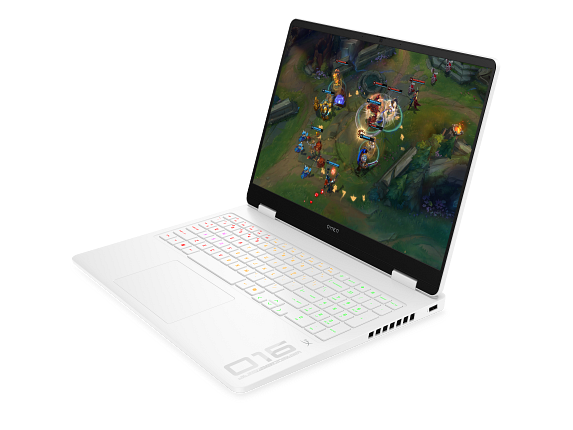
OMEN Gaming Laptop 16t-am000, 16"

HP

16 GB RAM512 GB StorageIntel® Core™ Ultra 5 225H (up to 4.9 GHz, 18 MB L3 cache, 14 cores, 14 threads)NVIDIA® GeForce RTX™ 5050 Laptop GPU (8 GB)16"
$1,199.99

Why it made the list: Core Ultra 5 225H supports the heavier-workload case: it is a 14-core/14-thread chip from the Arrow Lake-H generation with boost clocks up to 4.9GHz, which fits heavier multitasking better than entry silicon. A 16" panel nudges it toward desk-friendly productivity rather than the always-in-your-bag school laptop. Plan for the weight downside: fitting this much performance into a laptop chassis means carrying a bit more than the thin-and-light picks on this page.

Best for higher frame rates

Alienware 16 Aurora Gaming Laptop - NVIDIA Laptop

Dell

16 GB RAM512 GB StorageIntel® Core™ 7 Processor (Series 2) 240H (24MB cache, 10 cores, 1.80 to 5.20 GHz P-Core)NVIDIA® GeForce RTX™ 5050, 8 GB GDDR716"
$1,199.99

Why it made the list: It rounds out the lineup as a purpose-built gaming chassis rather than a casual GPU add-on, which is a lane the top picks do not fully claim. What separates this SKU is the mix of NVIDIA® GeForce RTX™ 5050, 8 GB GDDR7, 16GB RAM, 512GB SSD, which is why it has a distinct role here. The tradeoff is portability: this kind of power usually means more bulk, so plan on it being a carry-sometimes machine, not the lightest all-day companion.

Want More Control?

Match your laptop to your specific engineering software requirements. Filter by GPU, RAM, CPU, and more in the full FilterKilter tool.

Open FilterKilter — Full Filtering & Sorting Tool →

Frequently Asked Questions

Do engineering students need a dedicated GPU?

In most cases, yes. CAD software like SolidWorks and AutoCAD benefits significantly from a dedicated GPU. Even a mid-range NVIDIA RTX 4050 makes a noticeable difference over integrated graphics.

Can I use a Mac for engineering?

It depends on your program. Many engineering tools (SolidWorks, ANSYS) are Windows-only. Some programs offer Mac-compatible alternatives or allow VMs, but check with your department first.

How much should an engineering student spend on a laptop?

Budget $1,000-$1,800 for a laptop that will last through your degree. Investing in good specs upfront saves you from needing to upgrade mid-program.

Sources and Notes

GeForce RTX laptop GPUs

NVIDIA. GPU-family context for gaming and GPU-accelerated creative guides. Accessed 2026-05-21.

Steam Hardware and Software Survey

Valve. Market context for common gaming hardware and realistic gaming expectations. Accessed 2026-05-21.

AutoCAD system requirements

Autodesk Support. CAD and architecture requirements for engineering and workstation guides. Accessed 2026-05-21.

Blender system requirements

Blender Foundation. 3D, animation, and rendering hardware guidance for creator and workstation guides. Accessed 2026-05-21.

Microsoft 365 and Office resources

Microsoft Support. Office and Microsoft 365 compatibility context for school, work, and productivity picks. Accessed 2026-05-21.

Browse All Laptop Buying GuidesClick to expand
← Browse all FilterKilter buying guides