Best Laptops for Engineering Students Under $2,000

By the FilterKilter Editorial Team

Reviewed July 23, 2026Picks unchanged since Jul 20, 2026

How we rank

Best Laptops for Engineering Students Under $2,000 is really about balancing graphics performance, thermal headroom, and overall value. This list leans into under $2,000, 16 GB of RAM or more, 512 GB of storage or more, 8+ CPU cores, and a dedicated GPU so you can compare the laptops that actually fit the brief. Use it as a shortlist, then narrow further inside FilterKilter once you know which tradeoffs matter most to you.

What to Look For

  • Set your budget first and treat under $2,000 as a hard constraint so you do not compare laptops that solve different problems.
  • Aim for at least 16 GB of RAM here so the laptop still feels comfortable once you add browser tabs, meetings, and background apps.
  • Storage fills up faster than buyers expect, so treat 512 GB as a practical floor once apps, media, SDKs, or project files start to accumulate.
  • If this category leans on sustained work, 8+ CPU cores is a useful baseline because burst performance alone does not tell you how the laptop feels under real load.
  • A dedicated GPU is part of the value equation in this category, but cooling and sustained performance matter just as much as the chip name on the spec sheet.

How We Chose

Best Laptops for Engineering Students Under $2,000 is for buyers comparing under $2,000, 16 GB of RAM or more, and 512 GB of storage or more. The hard part is separating meaningful specs from nice-looking extras, so this guide ranks live catalog picks by graphics performance, thermal headroom, and overall value.

  • 1Each pick must match the guide brief: under $2,000, 16 GB of RAM or more, 512 GB of storage or more, 8+ CPU cores, and a dedicated GPU.
  • 2The generator sorts matching laptops by overall FilterKilter rating first and applies a per-brand cap so one lineup does not crowd out the page.
  • 3The price ceiling is enforced from the slug and the product data, so an "under $2,000" guide cannot include over-budget picks.
  • 4Dedicated-GPU picks are judged on graphics capability, memory, cooling headroom, display quality, and price.
  • 5RAM and SSD capacity are treated as practical ownership factors, not just spec-sheet decoration.

Our Top Picks

Affiliate disclosure: Links to retailers on this page are affiliate links. If you buy after clicking one, we may earn a commission at no extra cost to you. Commissions do not influence which laptops we rank or in what order. See our full Affiliate Disclosure.

Data & accuracy: Rankings are based on publisher specifications, retailer pricing snapshots, and published system requirements. We do not physically test every laptop listed, and prices, configurations, and availability change frequently. Always confirm the exact configuration and final price on the retailer’s site before buying. See our full methodology →

Informational only: Content on this site is provided for informational purposes and is not professional, financial, or technical advice. Use your own judgment when making a purchase.

Acer Nitro V 15.6” FHD IPS 165Hz Gaming Laptop1

Image: Amazon · Affiliate link

Best for most students

acer Nitro V 15.6” FHD IPS 165Hz Gaming Laptop|Intel Core i5-13420H|NVIDIA GeForce RTX 5050|Webcam|Backlit |Black| 16GB…

Acer

16 GB RAM512 GB StorageIntel Core i5-13420HNVIDIA GeForce RTX 505015.6"
$899.99

Why it made the list: It fits technical work where GPU support and sustained performance are safer bets than ultraportable design alone. It tips the scale at 4.6 pounds, which is the price you pay for a proper keyboard deck and room for the components inside. The faster 165Hz screen gives it a smoother feel than basic productivity laptops, even outside games.

Best for heavier creative work

Acer Swift 14 AI Laptop - SF14-61T-R49D

Acer

16 GB RAM1 TB StorageAMD Ryzen™ AI 9 365 Deca-core 4 GHzAMD Radeon™ 880M dedicated memory14"
$949.99

Why it made the list: The buyer here is someone whose coursework or job can punish thin laptops with weak graphics. Its price is one of the reasons it survives the comparison, especially if your goal is useful performance without paying for unused headroom. The 14" display is small but that is the point. It is chosen for carry more than for desk real estate.

Best for heavier creative work

Asus Expertbook P3 Pm3406

ASUS

16 GB RAM1 TB StorageAMD Ryzen™AI 7 350 Processor 2.0GHz (16MB Cache, up to 5.0 GHz, 8 cores, 16 Threads); AMD XDNA™ NPU up to 50 TOPS AMD Ryzen™AI 5 330 Processor 2.0GHz (8MB Cache, up to 4.5 GHz, 4 cores, 8 Threads); AMD XDNA™ NPU up to 50 TOPSAMD Radeon™ 860M AMD Radeon™ 820M14"
$949.99

Why it made the list: It stays in the upper half of the list by being a production-minded configuration rather than trying to be everything. It is better positioned for CAD, simulation, and heavier technical coursework than the thinner everyday machines on this page. Weight is a real selling point here. 3.0 pounds is well under the category average and makes everyday carry a non-event.

Best for heavier creative work

Asus Expertbook P3 Pm3606

ASUS

16 GB RAM1 TB StorageAMD Ryzen™AI 7 350 Processor 2.0GHz (16MB Cache, up to 5.0 GHz, 8 cores, 16 Threads); AMD XDNA™ NPU up to 50 TOPS AMD Ryzen™AI 5 330 Processor 2.0GHz (8MB Cache, up to 4.5 GHz, 4 cores, 8 Threads); AMD XDNA™ NPU up to 50 TOPSAMD Radeon™ 860M AMD Radeon™ 820M
$979.99

Why it made the list: The target reader is a student running SolidWorks, MATLAB, or similar tools where a real GPU and plenty of memory both matter. Asus Expertbook P3 Pm3606 keeps the fourth slot because $980 street price plus AMD Radeon™ 860M gives this listing a specific job in the lineup. For the fourth pick, Asus Expertbook P3 Pm3606 leans on $980 street price plus AMD Radeon™ 860M instead of a generic value argument.

Best for higher frame rates

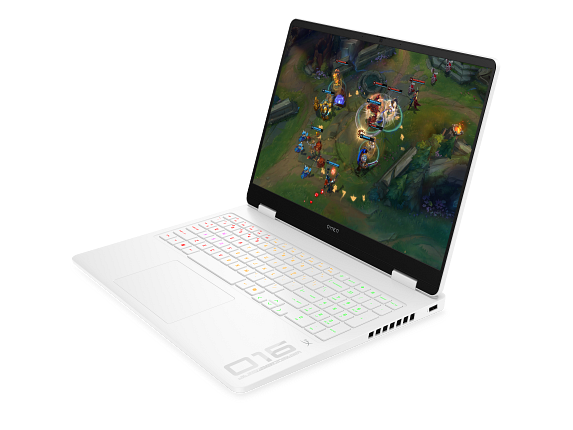
OMEN Gaming Laptop 16t-am000, 16"

HP

16 GB RAM512 GB StorageIntel® Core™ Ultra 5 225H (up to 4.9 GHz, 18 MB L3 cache, 14 cores, 14 threads)NVIDIA® GeForce RTX™ 5050 Laptop GPU (8 GB)16"
$1,149.99

Why it made the list: Its 16" screen is meaningfully bigger than the compact options here, and that extra real estate is where the productivity gain actually lives. Memory is not the bottleneck here. 16GB gives it enough room for normal work, school, and light creative overlap. Treat it as a comparison pick first: $1,150 street price is the part that should decide whether it belongs above a cleaner-looking alternative.

Best for higher frame rates

Alienware 16 Aurora Gaming Laptop

Dell

16 GB RAM512 GB StorageIntel® Core™ 7 Processor (Series 2) 240H (24MB cache, 10 cores, 1.80 to 5.20 GHz P-Core)NVIDIA® GeForce RTX™ 5050, 8 GB GDDR716"
$1,199.99

Why it made the list: The 16GB memory configuration is the practical baseline now, especially if your day includes a browser, meetings, documents, and background apps. Running 16" of screen makes multitasking less cramped, which is usually what people actually notice day to day.

Best for higher frame rates

OMEN Gaming Laptop 16z-ap000, 16.1"

HP

16 GB RAM512 GB StorageAMD Ryzen™ 9 8940HX (up to 5.3 GHz, 64 MB L3 cache, 16 cores, 32 threadsNVIDIA® GeForce RTX™ 5060 Laptop GPU (8 GB)16"
$1,299.99

Why it made the list: 16GB of RAM lands in the current sweet spot: enough for real multitasking without pushing the price up the way 32GB configurations tend to. A 16" panel nudges it toward desk-friendly productivity rather than the always-in-your-bag school laptop.

Best for higher frame rates

Alienware 16 Aurora Gaming Laptop - NVIDIA Laptop

Dell

16 GB RAM1 TB StorageIntel® Core™ 7 Processor (Series 2) 240H (24MB cache, 10 cores, 1.80 to 5.20 GHz P-Core)NVIDIA® GeForce RTX™ 5050, 8 GB GDDR716"
$1,659.99

Why it made the list: GeForce RTX 5050 Laptop GPU matters for this guide because it brings 8GB GDDR7 and 2,560 CUDA cores, giving GPU-accelerated apps more to work with than an integrated-only laptop. The 16GB RAM spec is the part that keeps it usable beyond the lightest browser-only routine. The tradeoff is portability: this kind of power usually means more bulk, so plan on it being a carry-sometimes machine, not the lightest all-day companion. Skip it if the lowest possible price matters most. That is the catch. Compare closely.

Want More Control?

Use this guide as the shortlist, then refine by price, RAM, GPU, battery life, weight, display size, and software requirements inside the full FilterKilter tool.

Open FilterKilter — Full Filtering & Sorting Tool →

Frequently Asked Questions

What should you compare first in this category?

Start with the non-negotiables for this kind of student / educator: performance, portability, display size, and price. Once those are aligned, compare smaller quality-of-life details like ports, keyboard feel, battery life, and thermals.

How much RAM is enough?

16 GB is the practical baseline here because it gives you enough headroom for multitasking and keeps the laptop from feeling cramped too quickly.

Why does a dedicated GPU matter here?

This category benefits from stronger graphics performance, but you should still judge the whole package: cooling, power limits, display quality, and battery life matter just as much as the GPU model.

Sources and Notes

R / RStudio system requirements

Posit. Official Posit requirements for R / RStudio; the recommended tier calls for 8 GB RAM and 4 CPU cores, informing this guide's memory and processor thresholds. Accessed 2026-06-08.

Zotero system requirements

Digital Scholar. Official Digital Scholar requirements for Zotero; the recommended tier calls for 8 GB RAM and 4 CPU cores, informing this guide's memory and processor thresholds. Accessed 2026-06-08.

Anaconda (Python) system requirements

Anaconda Inc.. Official Anaconda Inc. requirements for Anaconda (Python); the recommended tier calls for 8 GB RAM and 4 CPU cores, informing this guide's memory and processor thresholds. Accessed 2026-06-08.

GeForce RTX laptop GPUs

NVIDIA. GPU-family context for gaming and GPU-accelerated creative guides. Accessed 2026-05-21.

Steam Hardware and Software Survey

Valve. Market context for common gaming hardware and realistic gaming expectations. Accessed 2026-05-21.

AutoCAD system requirements

Autodesk Support. CAD and architecture requirements for engineering and workstation guides. Accessed 2026-05-21.

Blender system requirements

Blender Foundation. 3D, animation, and rendering hardware guidance for creator and workstation guides. Accessed 2026-05-21.

Microsoft 365 and Office resources

Microsoft Support. Office and Microsoft 365 compatibility context for school, work, and productivity picks. Accessed 2026-05-21.

Check Exact Software Requirements

FilterKilter scores every laptop in its catalog against official publisher system requirements. Open any title below for its minimum, recommended, and optimal specs — plus a live list of laptops that meet them.

Browse all software system requirements →

Browse All Laptop Buying GuidesClick to expand
← Browse all FilterKilter buying guides